User Management
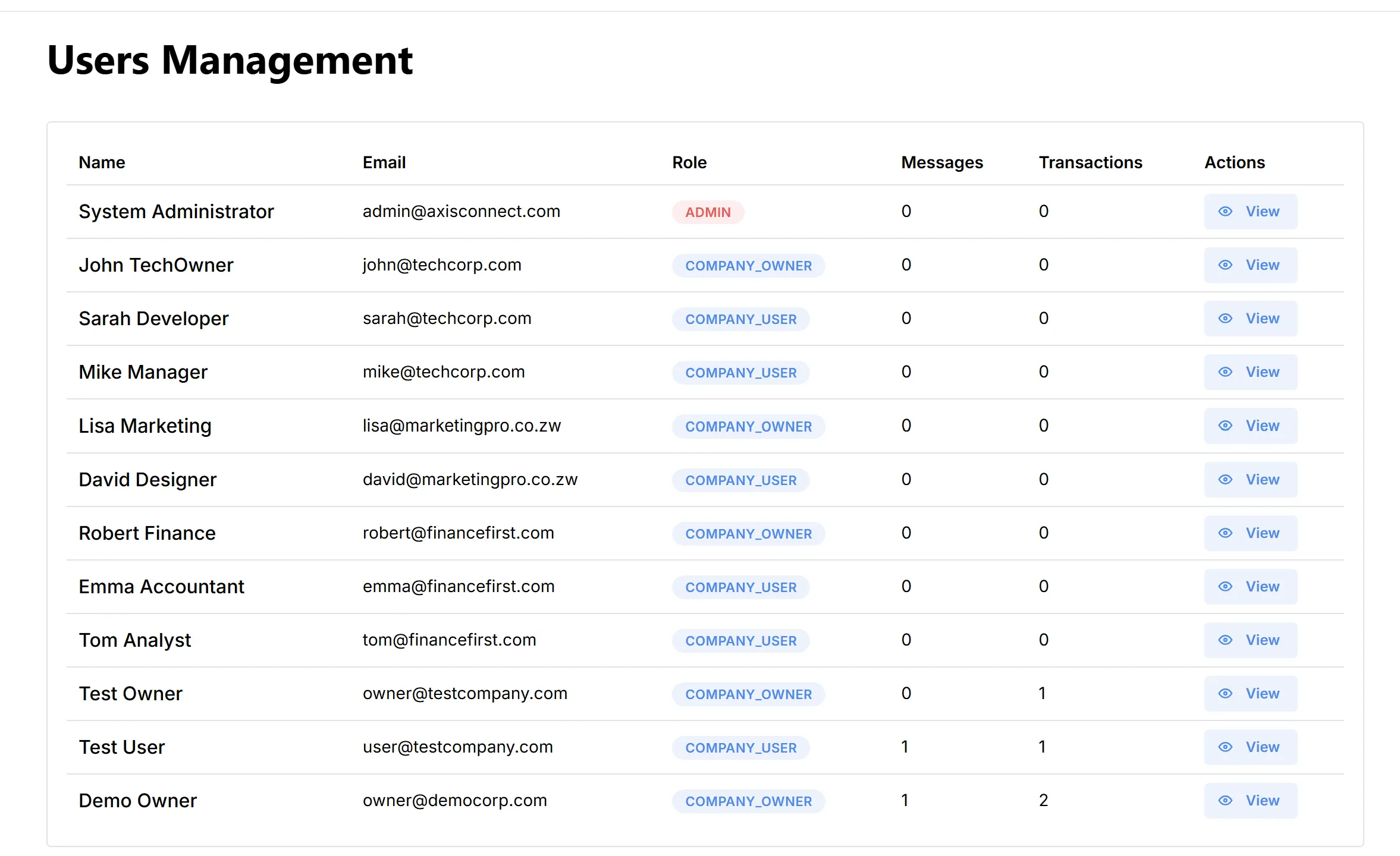
The Users Management page provides administrators with a comprehensive view of all registered users on the Axis Connect platform. This interface enables easy monitoring and management of user accounts, roles, and activity.
Reference:
Overview
The Users Management table displays the following details for each registered user:
- Name: Full name or display name of the user.
- Email: User’s registered email address.
- Role: Indicates the user’s role (e.g.,
ADMIN,COMPANY_OWNER,COMPANY_USER). - Messages: Number of messages sent by the user.
- Transactions: Number of credit transactions performed by the user.
- Actions: Quick access to view detailed information about the user.
User Roles
- ADMIN: Platform administrators with full access and control.
- COMPANY_OWNER: Main account holder for a company, with management privileges for their company’s users and messaging activities.
- COMPANY_USER: Regular users under a company, typically with permissions to send messages and view reports.
Actions
- View: Click the “View” button to see detailed information about a specific user, including their profile, messaging activity, and transaction history.