Credits Management
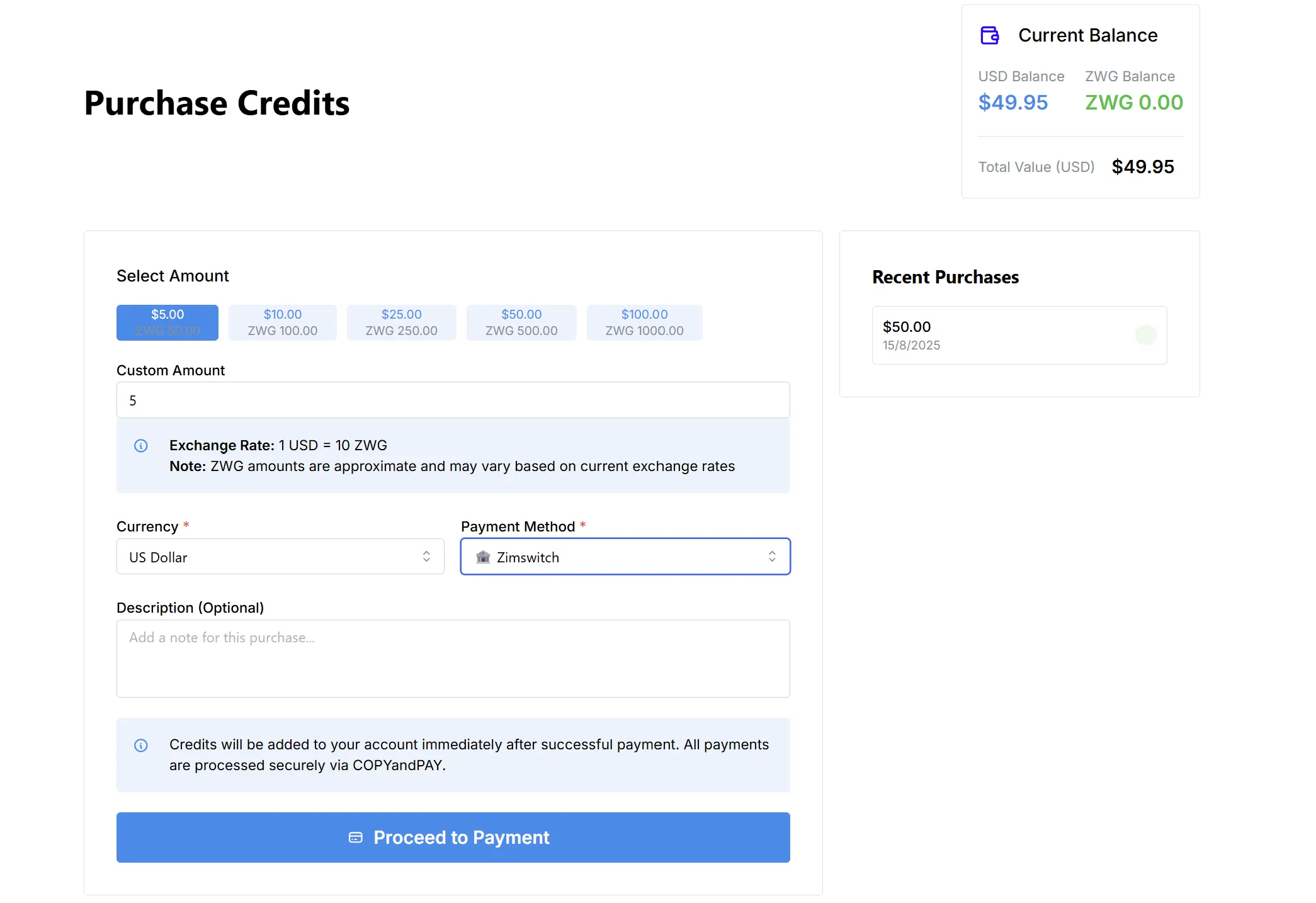
The Purchase Credits page enables you to top up your account balance quickly and securely. Choose your desired amount, select a currency and payment method, and complete your purchase in a few easy steps.
Overview
-
Current Balance:
View your existing credit balances in both USD and ZWG, along with your total account value. -
Recent Purchases:
A summary panel displays your latest credit purchases and the corresponding amounts/dates.
How to Purchase Credits
-
Select Amount:
- Choose from preset amounts (e.g., $5, $10, $25, $50, $100) or enter a custom value.
- Each selection displays the approximate ZWG equivalent using the current exchange rate.
- Exchange rate notice: Displayed for transparency; ZWG values may change with market rates.
-
Currency:
- Select the currency for your purchase (e.g., US Dollar or ZWG).
-
Payment Method:
- Choose your preferred payment method (e.g., Zimswitch).
- All payments are securely processed via COPYandPAY.
-
Description (Optional):
- Add a note to help identify the purchase (for your records).
-
Proceed to Payment:
- Click to initiate the payment process.
- Credits are added immediately following a successful transaction.